

- About Us
- PRODUCTS
- SUPPORT
- Sales Guide
- LANGUAGE
 English-US
 Chinese Traditional
 Japanese
 Korean
 Russian
 German
 French
 Chinese Simplified
 Spanish
 Italian
SR4-B32
SR4-B32: 4-Bay USB-C Hardware RAID Storage
USB 3.2 Gen 2x2 (20Gbps) | Hardware RAID 5 | 150W Internal Power
SR4-B32: 4-Bay USB-C Hardware RAID Storage
USB 3.2 Gen 2x2 (20Gbps) | Hardware RAID 5 | 150W Internal Power

Overview
The SR4-B32 is a 4-bay hardware RAID enclosure engineered for professional workflows that demand data protection and high-bandwidth USB-C connectivity. It supports USB 3.2 Gen 2x2 (up to 20Gbps) and connects to Thunderbolt™ 3/4 computers via their USB-C ports as a USB storage device, as well as USB 10Gbps/5Gbps hosts.
A dedicated hardware RAID controller enables RAID 5 protection (plus BIG, JBOD, and RAID 0). For continuous-duty reliability, the SR4-B32 integrates a 150W internal PSU, active cooling, and hot-swappable, lockable drive trays.
Features
1. Interface & Performance
● Connectivity: USB Type-C (USB 3.2 Gen 2x2).
● Thunderbolt™ 3/4/5 Host Use: Compatible via TB3/TB4 USB-C ports as a USB storage device.
● Link Speed: Up to 20Gbps (USB 3.2 Gen 2x2); see FAQ Q7 for link-speed negotiation requirements.

2. RAID & Data Protection
● Hardware Controller: RAID logic handled independently of host CPU.
● Supported Modes: RAID 0 (Striping), RAID 5 (Parity), JBOD (Independent), BIG (Spanning).
● Fault Tolerance: RAID 5 mode maintains data accessibility during a single drive failure.
● Rebuild Logic: Automatically initiates rebuild after inserting a replacement drive.

3. Hardware & Monitoring
● Windows Management GUI (Windows only): Tracks array status, alerts, and rebuild progress; RAID mode is configured via physical hardware controls only.

● Drive Support: 4x SATA III (6Gb/s) bays supports 3.5” HDDs and 2.5” HDDs/SSDs.

● Visual Diagnostics: LED indicators for Power, Drive Activity, and Drive Failure.
● Rebuild Tracking: 4-step progress LEDs (25% / 50% / 75% / 100%).
● Alert System: Integrated buzzer for critical errors; includes a physical Mute (ON/OFF) switch.
● Thermal Control: 80mm cooling fan with a rear-mounted High/Low speed switch.

4. OS & Workflow Compatibility
● Desktop OS: Plug-and-play support for Windows, macOS, and Linux.
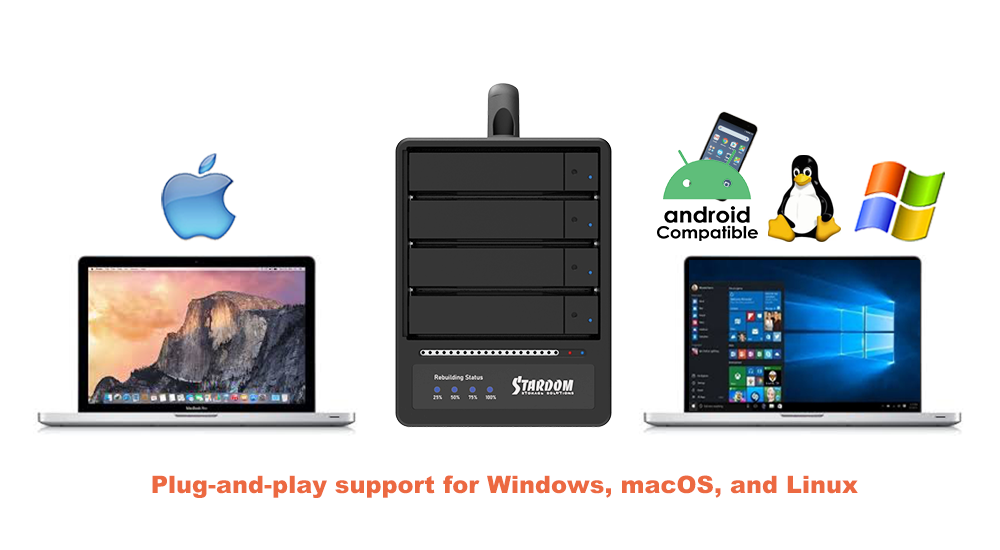
● Mobile Workflow: Compatible with Easy Data Vault for direct backup/restore operations with USB-C iPhone and iPad devices.

Buying Guide and Comparison Checklist
|
Decision area |
What to check |
Why it matters |
Practical buying tip |
|---|---|---|---|
|
Host interface |
USB-C USB 3.2 Gen 2 (10Gbps) vs Gen 2x2 (20Gbps); Thunderbolt™ 3/4 host use (as USB device) |
Determines peak link speed. USB 3.2 defines 5/10/20Gbps tiers. |
If you have mixed laptops/desktops, prioritize USB 20Gbps (Gen 2x2) but confirm your host PC actually supports 20Gbps (many USB-C ports are limited to 10Gbps). |
|
Thunderbolt™ 3/4 compatibility |
Can it plug into TB3/TB4 ports ? |
Thunderbolt ports are designed to accept USB peripherals; performance follows USB negotiation. |
Treat TB3/TB4 as a universal USB-C port for connectivity, but expect USB speeds unless the device is a true Thunderbolt device. |
|
RAID support |
Hardware RAID levels (RAID 0/1/5/10 + JBOD/BIG) vs JBOD-only |
Hardware RAID provides OS-independent protection and predictable performance. |
If you need fault tolerance, choose the SR4-B32 (RAID 5). JBOD-only models (like ST4-B32) are for expansion, not data protection. |
|
Capacity scaling (4-bay) |
Drive types (HDD/SSD), and max capacity |
4-bay arrays scale to tens of TBs depending on drive size and RAID level |
For the best value per TB, HDD RAID 5 is typical. For maximum performance, use SSDs with RAID 0. |
|
Thermal design |
Fan size & Chassis material |
Sustains performance and drive longevity under long writes/RAID rebuilds |
Prefer large fans (80mm+) and metal chassis for quieter, cooler continuous operation |
|
OS compatibility |
Windows / macOS / Linux support; any vendor utility dependencies |
Avoid workflow friction |
If a Windows tool exists, assume it is monitoring, unless explicitly documented for configuration |
|
Target use case |
Post, backup, shuttle, lab datasets |
Drives the “right RAID + right port” decision |
Map the workflow first (required RAID + required host port tier) |
Applications
1. DIT Ingest & Studio Handoff
Streamline the field-to-post pipeline. Technicians can ingest footage on-set using Thunderbolt™ 3/4 laptops, then physically transport the unit to the studio to plug into USB 3.2 Gen 2x2 workstations.
2. Hybrid Mac & PC Project Drive
The ultimate cross-platform bridge. The SR4-B32 acts as a universal project volume that moves seamlessly between Thunderbolt laptops (for review/analysis) and USB-C bench PCs (for capture/editing). It eliminates the need for network transfers or adapters when exchanging assets between Engineering, Design, and Video teams.
3. Portable RAID 5 "Archive Shuttle"
Safely transport massive datasets between office locations without the risk of a single drive failure causing data loss. The array maintains RAID 5 parity during transit; if a drive is damaged, the volume remains accessible in "degraded mode" and rebuilds automatically once the drive is replaced.
4. 4K/8K Video Post-Production
A high-throughput solution for video editing, rendering, and proxy generation. Whether serving as the primary project volume for a docked laptop editing station or a desktop tower, the SR4-B32 delivers the consistent bandwidth required for high-resolution media workflows.

5. Scientific Research & Analysis
Reliable storage for critical data logging. Capture experimental data on a laboratory bench PC, then move the entire enclosure to a Thunderbolt-equipped laptop for analysis. The fault-tolerant design ensures that long-running datasets remain secure throughout the transfer process.
6. Enterprise Backup & Archiving
A scalable target for workstation imaging and long-term asset retention. With high capacity and hardware redundancy, the SR4-B32 mitigates the risk of disk failure, making it an ideal local backup destination for small servers and creative workstations.

Frequently Asked Questions (FAQ)
Q1: How does the SR4-B32 compare with other STARDOM 4-bay storage models?
A: The SR4-B32 is the hardware RAID option in STARDOM’s 4-bay lineup, adding RAID modes (including RAID 5) for data protection and sustained workflow continuity. By contrast, ST4-B31 and ST4-B32 are JBOD enclosures designed for independent-drive expansion (no RAID). For connectivity, all three use USB-C; SR4-B32 can also be used with Thunderbolt™ 3/4 hosts when connected as a USB storage device (performance follows USB negotiation).
|
Feature |
ST4-B31 |
ST4-B32 |
SR4-B32 |
|---|---|---|---|
|
Model Type |
4-bay JBOD storage |
4-bay JBOD storage |
4-bay Hardware RAID storage |
|
Product Focus |
Simple large-capacity JBOD |
Enhanced high-speed JBOD |
RAID with data protection & performance |
|
Interface |
USB 3.2 Gen 2 Type-C (up to 10Gbps) |
USB 3.2 Gen 2x2 Type-C (up to 20Gbps) |
USB 3.2 Gen 2x2 Type-C (up to 20Gbps) |
|
Thunderbolt™ 3/4 Host Use |
Compatible via TB USB-C ports as a USB device |
Compatible via TB USB-C ports as a USB device |
Compatible via TB USB-C ports as a USB device |
|
RAID Support |
JBOD only |
JBOD only |
BIG / JBOD / RAID 0 / RAID 5 |
|
Drive Bays |
4 × SATA 6Gb/s HDD/SSD |
4 × SATA 6Gb/s HDD/SSD |
4 × SATA 6Gb/s HDD/SSD |
|
Hot-Swappable Drives |
Yes |
Yes |
Yes |
|
Touch Button |
Yes |
No |
No |
|
Individual Drive Power Switches |
Yes |
Yes |
No |
|
LED Indicators |
Yes |
Yes |
Yes |
|
Cooling Fan |
Low-noise fan |
Adjustable low-noise fan |
Adjustable low-noise fan |
|
Mobile Backup Support |
Yes (Easy Data Vault) |
Yes (Easy Data Vault) |
Yes (Easy Data Vault) |
|
Best For |
Basic large-capacity storage |
High-speed large-capacity storage |
High-performance RAID storage with protection |
Q2: Which RAID modes does the SR4-B32 support?
A: The SR4-B32 supports BIG, JBOD, RAID 0, and RAID 5, allowing you to optimize for capacity aggregation, independent volumes, maximum performance, or parity-based protection.
Q3: What happens if a drive fails in RAID 5 mode?
A: The array enters a degraded state but remains accessible (read/write performance may be reduced). Replace the failed drive with a compatible drive, and the controller will automatically initiate rebuild to restore redundancy.
Q4: Does the SR4-B32 support hot-swapping?
A: Yes. The SR4-B32 features hot-swappable, lockable drive trays, enabling drive replacement without shutting down the enclosure (best practice: follow your standard RAID replacement/rebuild procedure).
Q5: How do I monitor system status?
A: RAID mode is selected exclusively via the physical hardware switch on the enclosure. A Windows monitoring utility is available to track array/enclosure status, event alerts, and rebuild progress, while front-panel indicators provide at-a-glance status across platforms.
Q6: Does SR4-B32 work with Thunderbolt™ 3/4 computers?
A: Yes. SR4-B32 can be used with Thunderbolt 3/4 USB-C ports as a USB storage device. No special adapter is typically required—use a suitable USB-C cable and connect directly to the host.
Q7: What is the maximum transfer speed, and what affects real-world throughput?
A: SR4-B32 supports USB 3.2 Gen 2x2 (up to 20Gbps), but the actual link runs at the highest USB mode supported end-to-end by the host port/controller, cable, and device (20/10/5Gbps). When used with Thunderbolt™ 3/4 computers, it connects as a USB storage device, so the same USB negotiation rules apply.
Q8: Is the cooling fan adjustable?
A: Yes. The built-in 80mm fan includes a rear High/Low speed switch so users can balance cooling headroom and acoustics.
Q9: What operating systems and mobile workflows are supported?
A: SR4-B32 supports Windows, macOS, and Linux for desktop workflows. For mobile use cases, it is compatible with Easy Data Vault for direct backup/restore operations with USB-C iPhone and iPad devices.
Performance test result for reference. The test result will vary depend on the test environment.

Product View

Specification
| Model No | SR4-B32 |
|---|---|
| Interfaces | USB 3.2 Gen 2x2 Type-C (Up to 20Gbps) |
| Supported Drives | 4 x 3.5”/2.5" SATA III HDD/SSD |
| Connectivity Compatibility | USB-C for PC and Mac |
| Certification | CE, FCC, RoHS |
| RAID Mode | RAID 0, RAID 5, BIG, JBOD |
| Operating System Support | Windows 7 or later, macOS 10.10 or later, Linux |
| Cooling System | 80mm Fan (High/Low Speed Switch) Aluminum chassis with active cooling |
| Monitoring & protection | RAID rebuild progress (25% / 50% / 75% / 100%) Overheat / fan failure LED + buzzer alerts Intelligent power-stabilization logic |
| Power Input | Internal 150W (AC 100–240V, 50-60Hz) |
| Dimensions | 210 x 124 x 166 mm (L x W x H) |
| Weight | 3.4kg per pcs (with packaging, excluding drives) |
| Packaging | 4 pcs per carton |
| Included Accessories | • 1x USB 3.2 Gen 2x2 Type-C to Type-C Cable • 1x Power Cord • 1x Accessory Kit (Drive Screws, Keys) • 1x Quick Installation Guide |
Related Products
|
i310-B31+ |
ST2-B31 |
ST4-B31 |
|
|
|
|
| SR4-B32 |  |
GUI Software for Windows Easy Data Vault App for iOS Sales Guide |
| Product Name | Brand | HD Type | HD Category | Model Number | Capacity | Note |
|---|---|---|---|---|---|---|
| SR4-B32 | Seagate | 3.5" HDD | Ironwolf Pro | ST16000NE000 | 16TB | |
| SR4-B32 | Seagate | 3.5" HDD | EXOS X22 | ST22000NM001E | 22TB | |
| SR4-B32 | WD | 3.5" HDD | DC HC590 | WUH722626ALE6L4 | 26TB | |
| SR4-B32 | Kingston | 2.5" SSD | SA400S72 | 240GB | ||
| SR4-B32 | Kingston | 2.5" SSD | SKC400 | 512GB | ||
| SR4-B32 | Kingston | 2.5" SSD | Hyper X | 480GB | ||
| SR4-B32 | KIOXIA | 2.5" SSD | EXCERIA | 960GB | ||
| SR4-B32 | Synology | 2.5" SSD | SAT5200 | 480GB | ||
| SR4-B32 | TOOMORE | 2.5" SSD | TP100 | 480GB | ||
| SR4-B32 | Crucial | 2.5" SSD | BX500 | 240GB | ||
| SR4-B32 | TCELL | 2.5" SSD | TT550 | 480GB | ||
| SR4-B32 | KLEVV | 2.5" SSD | N610 | 512GB | ||
| SR4-B32 | OWC | 2.5" SSD | Mercury Extreme Pro 6G | 240GB | ||
| SR4-B32 | TIGO | 2.5" SSD | S300 | 120GB | ||
| SR4-B32 | Samsung | 2.5" SSD | 860 QVD | 4TB | ||
| SR4-B32 | Samsung | 2.5" SSD | 860 PRO | 1TB | ||
| SR4-B32 | Samsung | 2.5" SSD | 870 EVO | 500GB | ||
| SR4-B32 | Intel SSD | 2.5" SSD | 730 Series | 480GB | ||
| SR4-B32 | Intel SSD | 2.5" SSD | 510 Series | 512GB | ||
| SR4-B32 | PQI | 2.5" SSD | S511 | 120GB | ||
| SR4-B32 | OCZ SOLID3 | 2.5" SSD | SOLID3 | 120GB | ||
| SR4-B32 | SKHYNIX | 2.5" SSD | S31 | 500GB | ||
| SR4-B32 | FUJTISU | 2.5" SSD | F500S | 480GB | ||
| SR4-B32 | ANACONDA | 2.5" SSD | QS960 | 960GB | ||
| SR4-B32 | UMAX | 2.5" SSD | S330 | 480GB | ||
| SR4-B32 | Plextor | 2.5" SSD | PX-512S3C | 512GB | ||
| SR4-B32 | WD | 3.5" HDD | WUH722424ALE6L4 | 24TB | ||
| SR4-B32 | WD | 3.5" HDD | WD221KRYZ | 22TB | ||
| SR4-B32 | WD | 3.5" HDD | WUH722222ALE6L4 | 22TB | ||
| SR4-B32 | WD | 3.5" HDD | WD180PURZ | 18TB | ||
| SR4-B32 | WD | 3.5" HDD | WD161KRYZ | 16TB | ||
| SR4-B32 | WD | 3.5" HDD | WUH721414ALE64 | 14TB | ||
| SR4-B32 | WD | 3.5" HDD | WD120EFBX | 12TB | ||
| SR4-B32 | WD | 3.5" HDD | WD100PURZ-85W86Y0 | 10TB | ||
| SR4-B32 | WD | 3.5" HDD | WD8003FRYZ | 8TB | ||
| SR4-B32 | WD | 3.5" HDD | WD60PURX | 6TB | ||
| SR4-B32 | WD | 3.5" HDD | WD60EZAZ | 6TB | ||
| SR4-B32 | WD | 3.5" HDD | WD4000FYYZ-01UL1B0 | 4TB | ||
| SR4-B32 | WD | 3.5" HDD | WD30EZRX | 3TB | ||
| SR4-B32 | WD | 3.5" HDD | WD20EARS-00MVWB0 | 2TB | ||
| SR4-B32 | WD | 3.5" HDD | WD20EZAZ | 2TB | ||
| SR4-B32 | WD | 2.5" HDD | WD20SPZX | 2TB | ||
| SR4-B32 | WD | 3.5" HDD | WD10EZEX-00UD2A0 | 1TB | ||
| SR4-B32 | WD | 2.5" HDD | WD10SPZX | 1TB | ||
| SR4-B32 | WD | 3.5" HDD | ST32000NT000 | 32TB | ||
| SR4-B32 | WD | 3.5" HDD | ST30000NT011 | 30TB | ||
| SR4-B32 | WD | 3.5" HDD | ST28000NT000 | 28TB | ||
| SR4-B32 | WD | 3.5" HDD | ST22000NM001E | 22TB | ||
| SR4-B32 | WD | 3.5" HDD | ST22000NT001 | 22TB | ||
| SR4-B32 | WD | 3.5" HDD | ST20000NM007D | 20TB | ||
| SR4-B32 | WD | 3.5" HDD | ST12000DM0007 | 12TB | ||
| SR4-B32 | WD | 3.5" HDD | ST10000NE0004 | 10TB | ||
| SR4-B32 | WD | 3.5" HDD | ST8000AS0002 | 8TB | ||
| SR4-B32 | WD | 3.5" HDD | ST6000VX0001 | 6TB | ||
| SR4-B32 | WD | 3.5" HDD | ST5000AS0001 | 5TB | ||
| SR4-B32 | WD | 3.5" HDD | ST4000VM000 | 4TB | ||
| SR4-B32 | WD | 3.5" HDD | ST3000NM0005 | 3TB | ||
| SR4-B32 | WD | 3.5" HDD | ST32000641AS | 2TB | ||
| SR4-B32 | WD | 3.5" HDD | ST1000DM010 | 1TB | ||
| SR4-B32 | TOSHIBA | 3.5" HDD | MG09ACA18TE | 18TB | ||
| SR4-B32 | TOSHIBA | 3.5" HDD | HDWR21EUZSVA | 14TB | ||
| SR4-B32 | TOSHIBA | 3.5" HDD | MG07ACA12TE | 12TB | ||
| SR4-B32 | TOSHIBA | 3.5" HDD | MD06ACA10TV | 10TB | ||
| SR4-B32 | TOSHIBA | 3.5" HDD | MD04ACA600 | 6TB | ||
| SR4-B32 | TOSHIBA | 3.5" HDD | MD04ABA500V | 5TB | ||
| SR4-B32 | TOSHIBA | 3.5" HDD | MD04ABA400V | 4TB | ||
| SR4-B32 | TOSHIBA | 3.5" HDD | MG03ACA100 | 3TB | ||
| SR4-B32 | TOSHIBA | 3.5" HDD | DT01ACA200 | 2TB | ||
| SR4-B32 | TOSHIBA | 3.5" HDD | DT01ACA100 | 1TB | ||
| SR4-B32 | HGST | 3.5" HDD | HUH721212ALE600 | 12TB | ||
| SR4-B32 | HGST | 3.5" HDD | HUH721010ALN600 | 10TB | ||
| SR4-B32 | HGST | 3.5" HDD | HUH728080ALE600 | 8TB | ||
| SR4-B32 | HGST | 3.5" HDD | HUS726060ALE610 | 6TB | ||
| SR4-B32 | HGST | 3.5" HDD | HDN726040ALE614 | 4TB | ||
| SR4-B32 | HITACHI | 3.5" HDD | HDS723020BLA642 | 2TB | ||
| SR4-B32 | HITACHI | 3.5" HDD | HUA722010CLA330 | 1TB |











RaidonTek.com (stardom.com.tw) uses cookies to improve site functionality and your overall experience by storing necessary information for service delivery. By continuing, you consent to our use of cookies as detailed in our Privacy Policy, which provides more information about this usage. (Accept cookies to continue browsing the website)



.png)
.png)